 Playfest Berita Teknologi Terbaru
Microsoft Surface Pro Review: Is it the ultimate 2-in-1 device or just another overpriced gadget? We dive deep into the performance, design, software, and overall value of the Surface Pro line, comparing different models and exploring its strengths and weaknesses. This isn’t just another spec sheet rundown; we’ll unpack the real-world user experience and help you decide if it’s the right fit for your needs.
From its sleek design and versatile functionality to its powerful processing capabilities and vibrant display, the Surface Pro has carved a niche for itself in the tech world. But with a price tag that reflects its premium features, the question remains: does it justify the cost? This comprehensive review will explore every facet of the Surface Pro experience, helping you determine whether this hybrid device is worth the investment.
Performance and Specifications: Microsoft Surface Pro Review
Let’s dive into the nitty-gritty of what makes a Surface Pro tick – or, more accurately, what makes it *think*. We’ll unpack the performance differences across various models, helping you choose the right Surface Pro for your needs. Forget vague marketing speak; we’re getting down to the specs.
Processing Power
The Surface Pro lineup boasts a range of processors, impacting everything from everyday tasks to demanding applications. Early models relied on Intel Core m processors, offering decent performance for lighter workloads. Later generations transitioned to Intel Core i5 and i7 processors, delivering significant boosts in processing power, particularly noticeable when multitasking or running resource-intensive software like video editing suites or 3D modeling programs. The most recent models often feature Intel’s Evo platform or even Microsoft’s own SQ processors (in the Surface Pro X), which are designed for ultra-thin and light devices but might compromise on raw power compared to their Intel counterparts in some tasks. The choice depends heavily on your intended use. A casual user might find an older i5 model perfectly adequate, while a professional might need the horsepower of a newer i7 or even a dedicated GPU (not available in all models).
Battery Life
Battery life is a crucial factor, and it varies considerably across Surface Pro generations. Older models typically offered around 6-8 hours of battery life on a single charge, suitable for a typical workday but not much more. Newer models, however, often boast improved battery technology and power-efficient processors, pushing battery life closer to 10-12 hours under moderate usage. Factors like screen brightness, background processes, and the type of tasks performed heavily influence battery life. For instance, streaming high-definition video will drain the battery much faster than simple web browsing. It’s worth noting that battery life is rarely consistent across all usage scenarios; manufacturers’ claims often reflect idealized conditions.
Storage Options and Performance
Storage options range from modest 128GB SSDs in entry-level models to expansive 1TB or even 2TB SSDs in higher-end configurations. The storage type (SSD) generally ensures fast boot times and quick application loading, but the capacity directly impacts your ability to store files, applications, and operating system updates. A larger SSD provides more space, but it also comes at a higher price. While a 128GB SSD might be sufficient for basic tasks, creative professionals or those who store large files will find a larger capacity essential to avoid constant file management and potential performance bottlenecks. Running out of storage space can severely impact performance, leading to slowdowns and application crashes.
Display Quality
Surface Pro displays have consistently been praised for their quality, but there are differences across models. Resolution varies, with higher resolutions (like 2736 x 1824 pixels) providing sharper images and more screen real estate. Brightness also varies; some models offer brighter displays, making them easier to use in direct sunlight. Color accuracy also differs, with higher-end models often featuring wider color gamuts, delivering more vibrant and accurate colors, which is particularly important for tasks like photo and video editing. The aspect ratio has also seen some changes over the generations, influencing the overall viewing experience.
Surface Pro Model Comparison
| Model | Processor | RAM | Storage | Display |
|---|---|---|---|---|
| Surface Pro 7 | Intel Core i5-1035G4 or i7-1065G7 | 8GB or 16GB | 128GB, 256GB, 512GB, 1TB | 12.3″ PixelSense, 2736 x 1824 |
| Surface Pro 8 | Intel Core i5-1135G7 or i7-1185G7 | 8GB, 16GB, or 32GB | 128GB, 256GB, 512GB, 1TB | 13″ PixelSense, 2880 x 1920 |
| Surface Pro X | Microsoft SQ1 or SQ2 | 8GB or 16GB | 128GB or 256GB | 13″ PixelSense, 2880 x 1920 |
Design and Build Quality
The Microsoft Surface Pro consistently impresses with its blend of sleek aesthetics and robust build. It’s a device that effortlessly transitions between tablet and laptop modes, making it a versatile option for both casual users and demanding professionals. The attention to detail in its design is immediately apparent, a testament to Microsoft’s commitment to crafting a premium product.
The Surface Pro’s ergonomics are a key selling point. Holding it as a tablet feels surprisingly comfortable, even for extended periods. The magnesium alloy chassis provides a solid, premium feel in the hand, while the slightly tapered edges prevent it from feeling bulky. When used as a laptop, the sturdy kickstand provides a stable and adjustable viewing angle, allowing for comfortable typing and screen interaction. The keyboard (sold separately) is generally well-received, offering a satisfying typing experience despite its relatively thin profile. However, users with larger hands may find the keyboard slightly cramped.
Materials and Durability
The Surface Pro is constructed primarily from magnesium alloy, a lightweight yet incredibly strong material known for its durability. This choice contributes significantly to the device’s overall sleekness and resilience. While not indestructible, the magnesium alloy chassis offers excellent protection against minor bumps and scratches. The display is covered with Gorilla Glass, further enhancing its resistance to damage. Overall, the Surface Pro exhibits a robust build quality that can withstand the rigors of daily use.
Physical Dimensions and Weight
The Surface Pro’s dimensions and weight vary slightly depending on the model and year of release. Generally, it’s a relatively compact and portable device. The thinner bezels contribute to a more modern and visually appealing design. While its weight isn’t feather-light, it remains manageable for carrying around. The exact dimensions and weight are detailed in the table below, providing a comparison across three different Surface Pro models.
Design Aesthetics and Comparison
The Surface Pro’s design philosophy emphasizes minimalism and elegance. Its clean lines, sharp corners, and subtle branding create a sophisticated and professional look. Compared to competitors like the iPad Pro, which prioritizes a more rounded and playful aesthetic, the Surface Pro leans towards a more mature and business-oriented design. While subjective, the Surface Pro’s design generally receives positive feedback for its professional appearance and build quality. In comparison to other 2-in-1 devices, the Surface Pro often stands out for its thinner profile and premium materials.
Surface Pro Model Comparison
| Model | Dimensions (inches) | Weight (lbs) | Materials |
|---|---|---|---|
| Surface Pro 7 | 11.5 x 7.9 x 0.33 | 1.7 | Magnesium alloy, Gorilla Glass |
| Surface Pro 8 | 11.5 x 8.2 x 0.33 | 1.96 | Magnesium alloy, Gorilla Glass |
| Surface Pro X | 11.3 x 7.9 x 0.28 | 1.68 | Aluminum, Gorilla Glass |
Use Cases and Target Audience
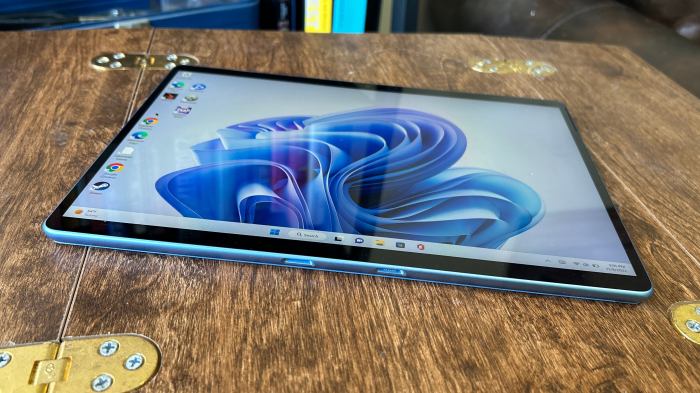
The Microsoft Surface Pro isn’t a one-size-fits-all device. Its unique blend of tablet portability and laptop power makes it a compelling option for a specific, yet surprisingly broad, range of users. Understanding its strengths and limitations is key to determining if it’s the right tool for your workflow.
The Surface Pro’s versatility stems from its 2-in-1 nature. It seamlessly transitions between tablet mode for casual browsing and note-taking, and laptop mode for more demanding tasks like video editing or coding. This adaptability makes it a powerful contender in several professional and personal spheres.
Ideal User Profiles and Workflows
The Surface Pro shines brightest in the hands of users who value portability and a powerful yet adaptable computing experience. Students, professionals, and creatives all find aspects of the device particularly useful. Students can take notes, access course materials, and complete assignments all on one device. Professionals can use it for presentations, email management, and light productivity tasks. Creatives can leverage its power for photo editing, graphic design (though higher-end models are recommended for intensive work), and even some video editing. The Surface Pro excels in scenarios requiring both mobility and processing power. For instance, an architect can easily sketch designs on-site using the pen and then switch to laptop mode for detailed CAD work later. A journalist can take notes during an interview and then quickly transcribe them and file the story using the same device.
Limitations of the Surface Pro, Microsoft surface pro review
While versatile, the Surface Pro has its limitations. Its keyboard, while decent, isn’t always as comfortable or spacious as a dedicated laptop keyboard. The battery life, while improved in newer models, can still fall short of some dedicated laptops, especially under heavy load. Furthermore, the higher-end configurations can be quite expensive, pushing it out of reach for budget-conscious buyers. For tasks requiring extensive gaming or heavy video editing, a dedicated laptop or desktop PC might still be a better choice due to superior cooling and processing power. The limited port selection can also be a drawback, necessitating the use of dongles for certain peripherals.
Surface Pro vs. Other Devices
The Surface Pro occupies a unique space in the tech landscape. Compared to traditional laptops, it sacrifices some keyboard comfort and potentially battery life for superior portability and the option of tablet functionality. Against tablets, it offers significantly more processing power and versatility thanks to its full Windows operating system and the ability to connect to external peripherals. The choice often boils down to prioritizing portability and versatility over raw power and keyboard comfort.
Surface Pro Suitability for Different Professional Roles
The following table compares the Surface Pro’s suitability for three different professional roles:
| Role | Suitability | Advantages | Disadvantages |
|---|---|---|---|
| Graphic Designer | Moderate (better with higher-end models) | Portability for on-site work, touch input for creative control. | Limited screen real estate, potential performance bottlenecks for complex projects. |
| Writer | High | Portability, comfortable typing (with Type Cover), note-taking capabilities. | Battery life might be a concern for all-day writing sessions. |
| Programmer | High | Full Windows support, ability to run IDEs and development tools, portability for remote work. | Smaller screen size compared to a desktop setup, may require external monitor for extended coding sessions. |
Accessories and Expandability
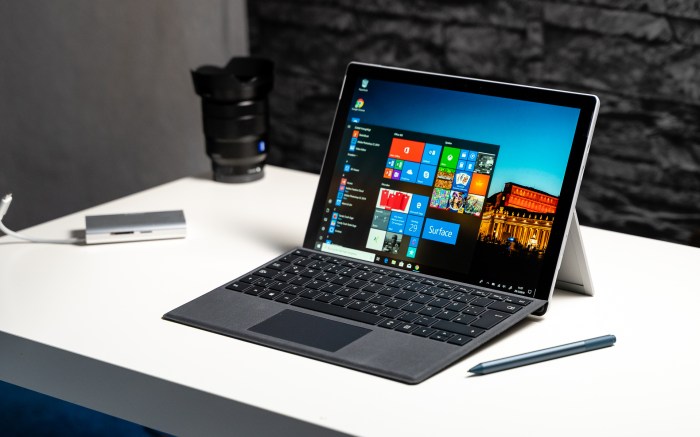
The Surface Pro’s versatility extends far beyond its sleek design and powerful processor. A robust ecosystem of accessories and surprisingly decent expandability options significantly impact its overall usability and value proposition. Choosing the right accessories can transform your Surface Pro experience, whether you’re prioritizing productivity, creativity, or entertainment. Let’s dive into the details.
Surface Pro Accessory Ecosystem
Microsoft offers a wide range of accessories designed specifically for the Surface Pro, ensuring seamless integration and optimal performance. These range from essential peripherals like keyboards and styluses to more specialized options like docking stations and external GPUs. The quality and design of these accessories generally align with the premium feel of the Surface Pro itself, though price points can vary considerably. Choosing the right accessories depends heavily on individual needs and budget.
Keyboard Options and Usability
The Surface Pro’s keyboard is arguably its most crucial accessory. Microsoft offers its Signature Keyboard, known for its comfortable typing experience and integrated fingerprint reader for enhanced security. Alternatively, there are several third-party keyboards available, offering varying degrees of quality, features, and price. While the Signature Keyboard provides a premium feel and excellent functionality, its price tag is significant. Budget-conscious users might consider a less expensive alternative, although they may sacrifice some comfort and build quality. The typing experience on the Signature Keyboard is generally praised for its key travel and responsiveness, making it suitable for extended periods of typing.
Surface Pen and Creative Applications
The Surface Pen, another essential accessory, enhances the Surface Pro’s capabilities for creative professionals and note-takers. Its pressure sensitivity and tilt recognition enable precise and natural inking, making it a powerful tool for digital art, note-taking, and annotation. Different generations of the Surface Pen offer varying features and functionalities, influencing their respective price points. The responsiveness and accuracy of the pen are key selling points, allowing for a smooth and intuitive drawing experience.
Docking Stations and Expandability
While the Surface Pro itself offers a limited number of ports, docking stations significantly expand its connectivity options. These docks provide additional USB ports, video outputs (HDMI, DisplayPort, etc.), and even Ethernet connectivity, making it easier to connect to external monitors, peripherals, and networks. The use of a docking station transforms the Surface Pro into a more powerful desktop replacement, offering increased productivity and flexibility. The choice of docking station depends on the specific needs, such as the number of ports required and the desired video output resolution.
External Storage and Other Expansion Options
The Surface Pro’s storage capacity can be limited, particularly in lower-end models. Fortunately, expansion is possible through the use of microSD cards or external USB drives. While microSD cards offer a relatively inexpensive way to expand storage, their speed can be a limiting factor for demanding applications. External USB drives, on the other hand, offer greater speed and capacity but require an available USB port. The choice between these options depends on the individual’s budget and storage needs.
Accessory Cost and Benefit Comparison
The cost of Surface Pro accessories can range from modest to substantial. The Signature Keyboard, for instance, is a premium accessory, adding considerably to the overall cost of the device. However, its improved typing experience and integrated fingerprint reader justify the expense for many users. On the other hand, less expensive alternatives might suffice for users who prioritize affordability over premium features. Ultimately, the decision of which accessories to purchase depends on individual needs, budget, and the intended use of the Surface Pro.
Common Surface Pro Accessories
| Accessory | Price Range (USD) | Key Features |
|---|---|---|
| Surface Pro Signature Keyboard | $129 – $159 | Comfortable typing, integrated fingerprint reader, Alcantara material |
| Surface Slim Pen 2 | $129 – $139 | Pressure sensitivity, tilt recognition, haptic feedback |
| Surface Dock 2 | $259 | Multiple USB ports, Ethernet, DisplayPort, USB-C Power Delivery |
| Surface USB-C to USB-A Adapter | $20 | Connects USB-A devices to Surface Pro’s USB-C port |
Ultimately, the Microsoft Surface Pro delivers a compelling blend of power and portability. While the price point is undeniably high, the seamless integration of hardware and software, coupled with its versatility as both a tablet and a laptop, makes it a strong contender for professionals, students, and creative individuals alike. Whether it’s the right choice for *you* depends on your specific needs and budget, but after exploring its capabilities, the Surface Pro’s appeal becomes undeniably clear. It’s not just a device; it’s a productivity powerhouse cleverly disguised as a sleek, modern tablet.